



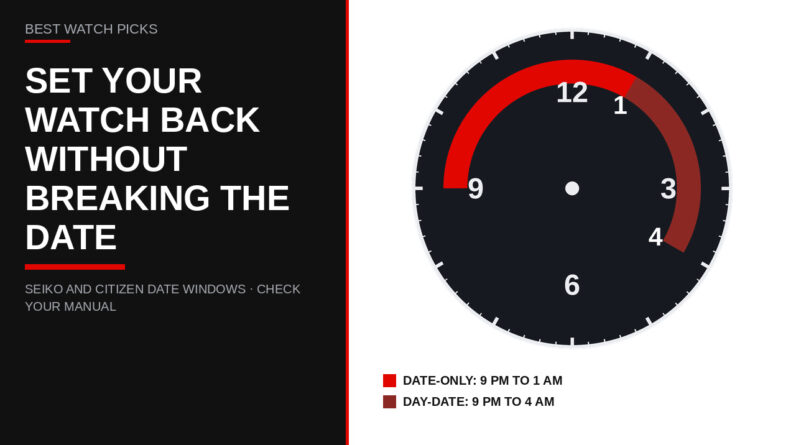
Clocks go back in the next two weeks in the UK, Europe, the US and Canada, and if you wear an analog date watch there you may be resetting it. Changing the hour is simple. The manuals warn about adjusting the date at the wrong time of night. Seiko and Citizen both print a window of hours when you should not adjust the calendar, and that window is not the same for every watch. In the Seiko and Citizen manuals I read, date-only models are 9 PM to 1 AM and day-and-date models run much later. This guide gives you the dates, the official windows, the steps for the watches I could check against a manual, and the one habit that avoids the problem.
When the clocks change
- Clocks in the UK and Europe change on Sunday, October 25, 2026. GOV.UK says UK clocks go back one hour at 2 a.m. The EU’s summer-time schedule for 2026 ends summer time on the same Sunday, October 25, at 1:00 a.m. UTC.
- Clocks in the US and most of Canada change on Sunday, November 1, 2026. NIST says daylight saving time in the US ends at 2:00 a.m. local time on the first Sunday of November, when the clock becomes 1:00 a.m.
Hawaii and most of Arizona do not change, according to timeanddate’s 2026 table. Neither do Japan, Singapore, India, China, the Philippines or Thailand. If you live in one of those places, you can skip the reset and just keep this for travel.
Know what you are wearing

Two things decide which rule applies to you.
- The first is whether the watch shows the date only, or both the day of the week and the date.
- The second is the movement inside. The movement or calibre number is usually engraved on the case back, and your manual and the maker’s support page are indexed by it.
Digital watches work differently. The Casio module I could check handles daylight saving with a setting, covered below.
What the official manuals say

These are the windows as the makers print them. They apply to the time your watch is showing when you adjust the date or day. Different movements have different rules, so confirm yours.
| Watch | Do not adjust the calendar between | Source |
|---|---|---|
| Seiko date-only (cal. 4R35, 4R15, 7S35) | 9:00 p.m. and 1:00 a.m. | Seiko instruction booklet for cal. 4R15/4R16/4R35/4R36/7S26/7S35/7S36 |
| Seiko day-and-date (cal. 4R36, 4R16, 7S26, 7S36) | 9:00 p.m. and 4:00 a.m. | Same booklet |
| Seiko models with date, or date and day of the week (Seiko online instructions) | Date only, 9:00 p.m. to 1:00 a.m. Date and day, 9:00 p.m. to 4:00 a.m. | Seiko online instructions, “How to set the time and date” |
| Citizen Eco-Drive, date only | 9:00 PM and 1:00 AM | Citizen instruction manual for B023, B035, B036, B690, E0xx, E1xx, J015, J165 |
| Citizen Eco-Drive, date and day of week | 9:00 PM and 4:30 AM | Same manual |
The consequences are described in Seiko’s own words. Its online instructions say that amending the date in these hours “may cause problems such as the date failing to change the next day or may cause damage.” Citizen says adjusting the calendar in the period may cause an incorrect change of indication, and it adds that the day-of-week indication starts changing around 1:00 AM and finishes after 4:00 AM. Citizen lists that note next to the longer day-and-date window, but the manual does not say one explains the other.
Both makers are talking about adjusting the date or day. Neither manual I read forbids setting the time at those hours. Still, as the next section explains, the simplest way to stay clear is not to do any of this late in the evening.
How Seiko says to set the time
Here is Seiko’s time-setting sequence for the 4R35 date-only and 4R36 day-and-date calibres, from the instruction booklet.
- If the crown screws down, unlock it by turning it counterclockwise.
- Pull the crown out to the second click. On the 4R35 and 4R36, do this when the second hand is at 12, and the second hand will stop.
- Turn the crown to move the hands. Advance the hands until the date changes to the next day. Seiko says that means the time is set for the A.M. period, so keep advancing to the correct time. If the calendar does not change as the hour hand passes 12, you are in the P.M. period.
- Push the crown back in, in step with a time signal, and lock it.
The booklet also gives a tip. Set the hands to a time a few minutes earlier than the correct time, then advance to the exact time. Seiko’s online instructions add that you should make sure AM and PM are right, because the date changes around midnight, and if they are wrong the date will change at noon instead.
None of the manuals I read mention setting the clock back a full hour for daylight saving. Seiko’s online page and Citizen’s manual do tell you to overshoot by 4 or 5 minutes and move back to the correct time. Seiko’s booklet instead says to set a few minutes early and advance. I am not claiming that turning back an hour is safe or harmful. Check your own manual for your calibre.
The habit that avoids the problem
This part is my own advice, not a quotation from a manual. Do the reset in the middle of the day. If your watch reads 2 p.m. and you turn it back to 1 p.m., you never come near the printed windows and you never pass midnight, so the date has no reason to move.
If you do need to correct the date, WatchScanning, a third-party watch-guide site, suggests moving the hands to about six o’clock before touching the date and then setting the real time. That site is not a manufacturer, and its general explanation of how date gears mesh is not from Seiko or Citizen. As a habit it fits both makers’ printed windows, since six o’clock sits outside every one of them. Your manual still outranks it.
After you change it
- Check that the date flips overnight. Seiko says the date changes around midnight. If it flips at noon, your AM and PM are reversed, and Citizen’s troubleshooting table gives the same fix, which is to adjust the time again so AM and PM are correct.
- If your watch has a simple calendar like the Seiko and Citizen models above, expect the next calendar correction on December 1. Seiko’s online instructions say the date needs manual adjustment at the end of February and 30-day months, and that the watch shows “31” instead of “1” until you do. Citizen’s manual says its calendar assumes a 31-day month and needs adjusting on the first days of March, May, July, October and December. November has 30 days, so December 1 is the next correction. Do that one in the daytime too.
- Do not fix it at bedtime. If the date looks wrong late in the evening, wait until the next afternoon.
If you wear a Casio digital
Module 3198/3299 handles daylight saving with an on and off setting in the watch menu. The steps below are from Casio’s official Operation Guide 3198/3299 and its DST quick guide for module 3198/3299, and they apply only to those modules. Look for the module number on the back of your watch. If yours is a different module, use that module’s manual.
- In Timekeeping Mode, press D until the Home City Time screen is showing.
- Hold A until the seconds start to flash.
- Press C to reach the DST setting screen.
- Press D to switch between Daylight Saving Time and Standard Time.
- Press A to exit. The DST indicator appears when daylight saving is on.
The guide describes daylight saving time as advancing the time setting by one hour from standard time. It also says the watch’s built-in full auto-calendar covers different month lengths, and that once you set the date you should not need to change it until a battery replacement. I did not find a date-change window in that guide, so the Seiko and Citizen warnings above do not carry over to it automatically. Other Casio modules have their own guides.
Where to read your own manual
Start with the maker’s own manual. Seiko and Citizen publish their instruction manuals online, and Casio’s support site has DST quick guides by module number. A Citizen manual I checked covers the calibres on its cover page. The Garrison review on this site lists a different calibre, J800, which is not on that cover page, so Garrison owners should find their own manual instead of borrowing a window from this guide.
If you own one of the watches we have reviewed, these are the posts for it.
- The Seiko 5 Sports SRPD65 review. The review lists the 4R36 calibre, so the day-and-date rule above applies to it.
- The Citizen Eco-Drive Garrison AW0050 review.
- The Casio AE1200WH-1A review, a world-time digital. Check the module number on your case back before you follow the Casio steps.
- Our guide to changing a watch strap, if you are already doing watch chores this weekend.
Frequently asked questions
What time should I not change the date on my watch?
It depends on the movement. Seiko and Citizen both say not to adjust the date between 9 p.m. and 1 a.m. on date-only models. On day-and-date models, Seiko says 9 p.m. to 4 a.m. and Citizen says 9 PM to 4:30 AM. Check your own manual.
Do I need to change the date when the clocks go back?
Turning the hour back does not mean the date needs changing. Setting the hands back one hour in the afternoon does not cross midnight, so the date has no reason to change. That is my reasoning, not a manual statement. Check that it flips at midnight afterward.
Does daylight saving time work the same way on a digital watch?
Casio’s guide for module 3198/3299 handles daylight saving with an on/off setting. Other modules may differ, so follow the manual for yours.
Sources
- Seiko instruction booklet, cal. 4R15/4R16/4R35/4R36/7S26/7S35/7S36
- Seiko online instructions, how to set the time and date
- Citizen Eco-Drive instruction manual
- Casio Operation Guide 3198/3299 and the Casio DST quick guide for module 3198/3299
- NIST, daylight saving time rules
- GOV.UK, when do the clocks change
- European Commission schedule for the summer-time period
- timeanddate, daylight saving time around the world in 2026